
Ultimate Colors
User Guide
The complete reference for capturing, organizing, applying and replacing colors from one focused After Effects panel.
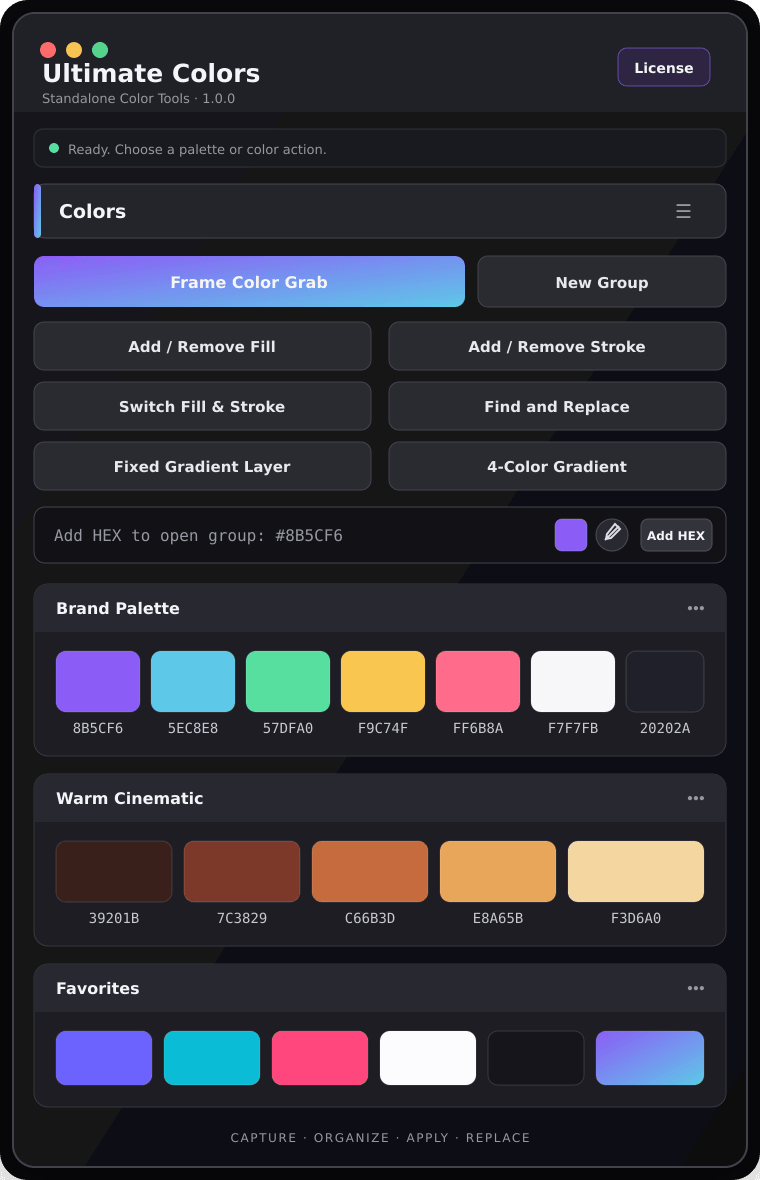
Quick start
Install the extension
Use the signed Ultimate_Colors_v1.0.2.zxp included with your purchase.
Use ZXP/UXP Installer or another trusted ZXP installer.
Open the signed ZXP and approve the installation.
Open Window → Extensions → Ultimate Colors.
Activation & licence
Activate this device
- Open Ultimate Colors.
- Paste your key in the format UC-XXXX-XXXX-XXXX-XXXX.
- Press Activate and wait for confirmation.
Interface tour
Palettes, groups & HEX
Color groups
Press New Group, name it, then add colors. Groups can be renamed, reordered, collapsed, imported and exported.
HEX input
Enter one or many HEX values separated by a space or comma. Click the preview to open the system color picker, then press Add HEX.
Frame Color Grab
Display the exact composition frame you want to analyze.
Ultimate Colors renders the frame and extracts dominant and accent colors.
No color is selected initially. Choose only the colors you want, then press Add.
Read and change every color in a layer
This is the core Ultimate Colors workflow: select a layer and click a swatch. The tool reads every editable color in that layer before making any change.
Select the shape, text, solid or supported effect layer whose color you want to change.
Click a saved swatch. Ultimate Colors scans the selected layer for all editable color properties.
All colors found in the layer are displayed as targets—such as Fill, Stroke, text and effect colors. Choose exactly which property receives the new color.
Find, replace & gradients
Find and Replace
Enter the existing HEX and replacement HEX, read colors from selected layers if needed, then run Replace.
Gradient tools
Fixed Gradient Layer adds Gradient Ramp. 4-Color Gradient adds four editable colors. Both are locked to the selected layer.
Settings & notifications
Swatch shortcuts
Choose a target and apply.
Apply as Stroke.
Edit the saved swatch.
Copy its HEX code.
Troubleshooting
The panel does not appear after installation
Restart After Effects and check Window → Extensions. Reinstall the signed ZXP if necessary.
Frame Color Grab cannot render
Open an active composition, make sure the playhead is on a valid frame, and verify that After Effects can write to its temporary folder.
Activation fails
Check the licence key, internet connection and device limit. Use Check Licence or contact support.
A swatch does not change the layer
Select a supported layer and choose an editable Fill, Stroke, text, solid or effect color target.
FAQ
Are palettes saved between sessions?
Yes. Palette data is stored locally and mirrored to Documents/ultimate colors/Settings.
Can I move palettes between computers?
Yes. Export selected groups as JSON, then import them on the other computer.
Where are the video tutorials?
Use the official playlist linked at the top of this guide and inside Ultimate Colors.
Still need help?
Send the After Effects version, operating system and exact error message.