
Control every color.
Keep your flow.
Capture, organize, apply and replace the colors you use every day from one focused panel—without breaking your creative rhythm.
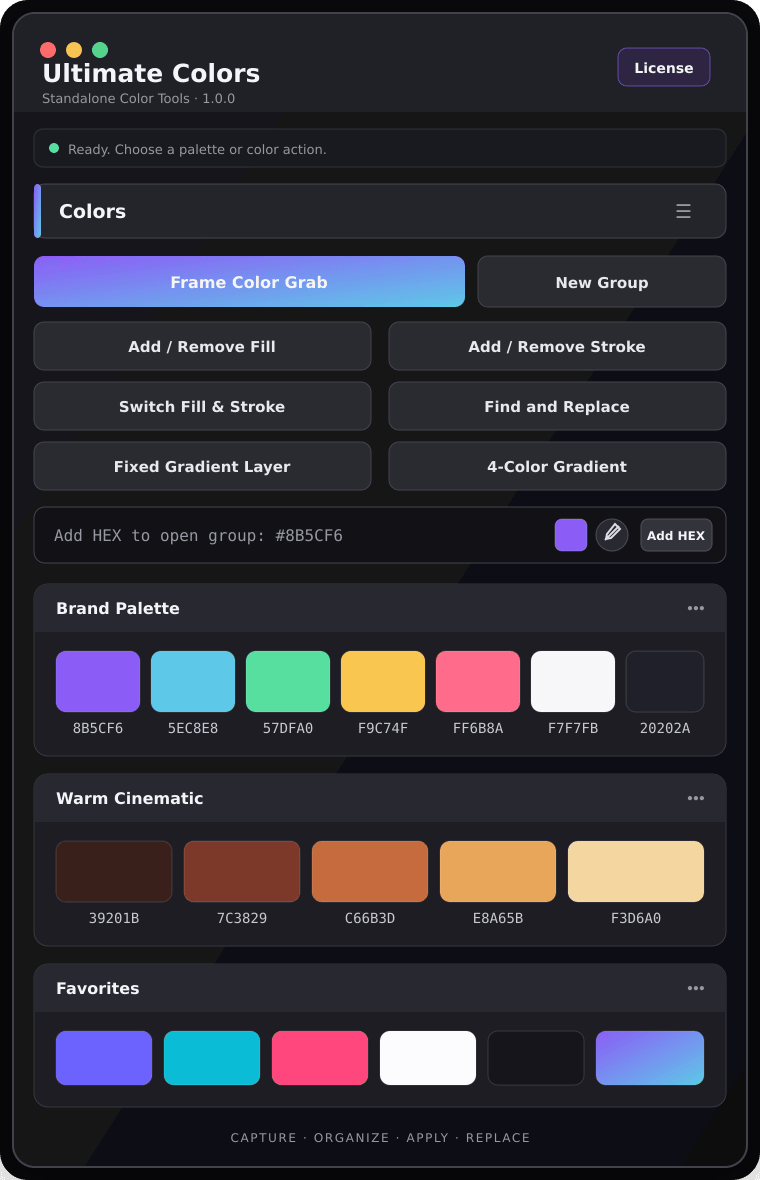
Actual extension interface
Select a layer. Click a color. Choose exactly what changes.
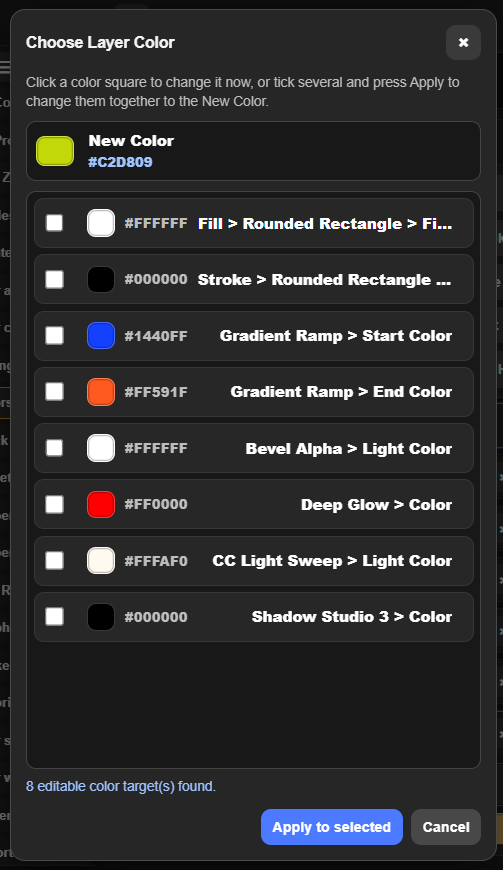
Ultimate Colors reads every editable color in the selected layer, then lets you choose the exact Fill, Stroke, text or effect color to update.
Select the layer. Pick a color. Choose the exact target.
Ultimate Colors scans the selected layer and lists every editable color property, so the new color only goes where you want it.
Choose the text, shape, image, or effect layer you want to recolor in After Effects.
Click a saved swatch or enter the exact HEX color you want to apply.
The target list shows Fill, Stroke, gradients, and effect colors found inside the selected layer.
Click a color square for an immediate change, or tick multiple targets and press Apply to selected.
No digging through nested effect controls. You see every editable color target in one list before anything changes.
Stop repeating the same color work.
Picking, copying, applying and replacing colors across layers is where small clicks multiply.
With Ultimate Colors
More than a color picker.
Every palette, swatch and color action stays close to the layers you are already editing.
Palette groups & favorites
Create collapsible palette groups, keep reusable swatches, mark favorites, and import or export complete palettes.
Frame Color Grab
Extract dominant and accent colors from the current composition frame—or only from selected visible layers.
HEX & system color picker
Add one or many HEX values, edit saved swatches, copy codes, or capture a color from anywhere on screen.
Precise color targets
Choose editable fill, stroke, text and effect color properties on the selected layers before applying a swatch.
Fill & stroke control
Add or remove fills and strokes, apply color in batches, and switch fill and stroke colors instantly.
Find, replace & gradients
Replace matching colors in selected layers, add fixed Gradient Ramp or 4-Color Gradient effects, and keep gradients locked to the layer.
Use the color the shot needs.
From frame sampling to final fill, stroke and gradient changes, the full workflow stays inside one compact panel.

Compact enough to stay open.
The interface stays compact in After Effects while keeping palettes and the most-used color actions within reach.
Small panel. Consistent color.
Color changes are grouped so you can undo the result without cleaning up a long trail of steps.
Works with native shape, text and effect color properties in your active composition.
A ZXP package for supported After Effects installations on Windows and macOS.
Your licence is verified securely and can be managed from your Ultimate Plugins account.
Ultimate Colors — Lifetime Licence
Pay securely with PayPal. After purchase, your licence key and download link are sent instantly to your PayPal email.
Everything you need to know.
What does Ultimate Colors do?
It gives you reusable palettes, frame color extraction, HEX and system color-picker tools, targeted fill and stroke application, color replacement, and gradient tools in one panel.
Is there a free trial?
No. This product does not include a trial period. A valid license key is required to use the extension.
Can I use it on shape, text and effect colors?
Yes. Ultimate Colors detects editable color targets on selected shape and text layers and supported effect properties.
How do I install it?
Download the signed .zxp file and install it using a ZXP/UXP installer. Then open it from Window → Extensions inside After Effects.
How many devices can I activate?
The current license activates one device. Contact support if you need help moving your activation to another machine.
Where can I learn every feature?
Use the tutorial linked on this page and inside the extension. The built-in Help / Shortcuts panel also explains every swatch action.
Choose once.
Color faster.
Keep the colors you use every day—and every action around them—inside one focused panel.
