
See it in under a minute
A fast look at how the panel removes repetitive layer-creation steps.
Create, place, parent and style the layers you use every day from one focused panel—without breaking your creative rhythm.
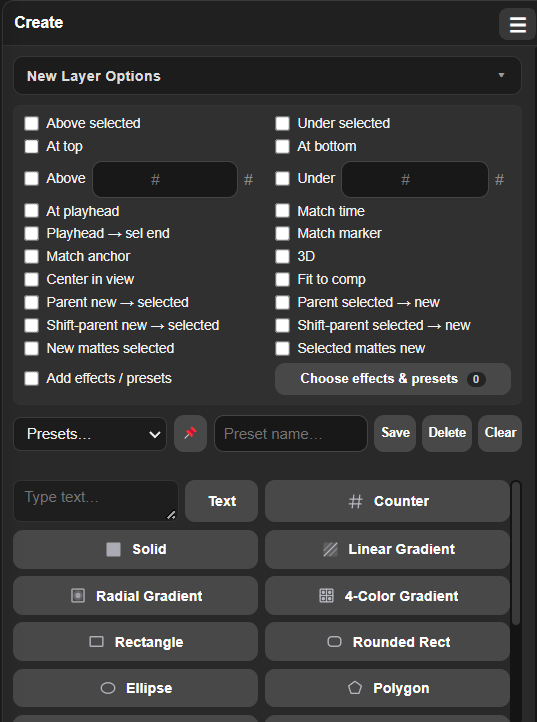 Actual extension interface
Start with the quick demo, then use the full tutorial to explore every creation tool and workflow.
A fast look at how the panel removes repetitive layer-creation steps.
The complete walkthrough: text, counters, solids, gradients, shapes, nulls, cameras, adjustment layers and more.
The layer itself is only the start. Placement, timing, parenting and effects are where the clicks multiply.
Every new layer can arrive with the position, timing, relationship and effects your shot already needs.
Place above or below the selection, at the top or bottom, at the playhead, and match timing or markers.
Search, multi-select and apply effects or animation presets automatically after the layer is created.
Enter creates the text, Shift+Enter adds a line, and text direction follows the language you type.
Build animated numbers with prefixes, suffixes, separators, digit control and support for every language.
Parent the new layer to the selection—or the selection to the new layer—while preserving transforms when needed.
Paste clipboard content or import an image URL directly into the project and active timeline.
Core layers, shapes, gradients, text, counters and imported media are always one click away.
This is the real Ultimate Create Layers interface. Hover over any control to see exactly what it does inside After Effects.
The interface adapts to narrow After Effects panels while keeping the controls you use most within reach.
Actions are grouped so you can undo the result without cleaning up a trail of steps.
Creates real text, shape, solid, adjustment, null and camera layers in your active comp.
A signed ZXP package for supported After Effects installations on both platforms.
The panel can let you know when a new release or another Ultimate Plugins tool is available.
Pay securely with PayPal. After purchase, your licence key and download link are sent instantly to your PayPal email.
It creates the most common After Effects layer types and can automatically control their timeline placement, timing, parenting, matching and applied effects or presets.
No. This product does not include a trial period. A valid license key is required to use the extension.
Yes. Text direction is selected automatically from what you type, and the counter supports prefixes and suffixes in all languages.
Download the signed .zxp file and install it using a ZXP/UXP installer. Then open it from Window → Extensions inside After Effects.
The current license activates one device. Contact support if you need help moving your activation to another machine.
Use the video guide linked on this page and inside the extension. It covers the interface and creation workflows step by step.
Put the layers you use every day—and the setup around them—behind one clean click.